

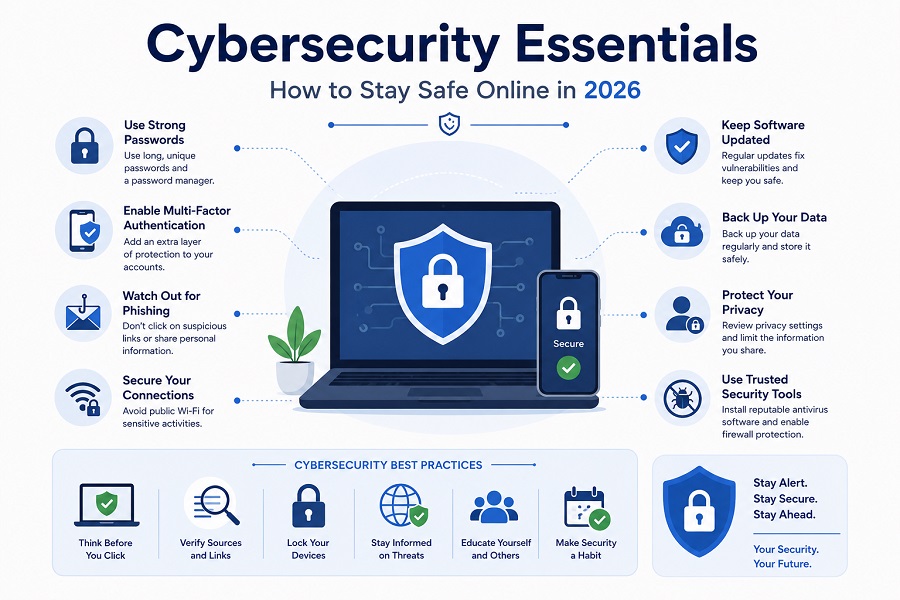
The internet has become an essential part of modern life. People use online services for banking, shopping, communication, education, entertainment, and business. While technology offers tremendous convenience, it also introduces cybersecurity risks that can threaten personal information, financial assets, and organizational data.
Cybercriminals continuously develop new techniques to exploit vulnerabilities and deceive users. As a result, cybersecurity is no longer just a concern for large corporations—it is a responsibility for everyone who uses the internet.
This comprehensive guide explains the fundamentals of cybersecurity, common online threats, and practical strategies to stay safe in an increasingly connected world.
What Is Cybersecurity?
Cybersecurity refers to the practice of protecting systems, networks, devices, and data from unauthorized access, attacks, and damage.
Cybersecurity aims to ensure:
- Confidentiality
- Integrity
- Availability
These three principles form the foundation of modern information security.
Confidentiality
Ensures information is accessible only to authorized individuals.
Integrity
Protects data from unauthorized modification.
Availability
Ensures systems and information remain accessible when needed.
Why Cybersecurity Matters
Cybercrime affects individuals, businesses, and governments worldwide.
Potential consequences include:
- Identity theft
- Financial losses
- Data breaches
- Reputation damage
- Business disruption
- Legal penalties
As digital dependence increases, cybersecurity becomes increasingly important.
Common Cyber Threats
Phishing Attacks
Phishing is one of the most common cyber threats.
Attackers send deceptive emails, messages, or websites designed to trick users into revealing:
- Passwords
- Credit card information
- Banking credentials
- Personal data
Malware
Malware is malicious software created to damage systems or steal information.
Common malware types include:
Viruses
Spread through infected files and programs.
Trojans
Disguise themselves as legitimate software.
Spyware
Secretly collects user information.
Adware
Displays unwanted advertisements.
Ransomware
Encrypts files and demands payment for restoration.
Password Attacks
Weak passwords remain one of the easiest ways for hackers to gain access.
Common methods include:
- Brute-force attacks
- Credential stuffing
- Password spraying
Social Engineering
Social engineering manipulates people into revealing sensitive information.
Attackers often exploit:
- Trust
- Fear
- Urgency
- Curiosity
Data Breaches
A data breach occurs when sensitive information is exposed or stolen.
Examples include:
- Customer records
- Login credentials
- Financial information
- Healthcare data
Creating Strong Passwords
Passwords remain a primary defense against cyberattacks.
Characteristics of Strong Passwords
A secure password should:
- Be at least 12 characters long
- Include uppercase letters
- Include lowercase letters
- Include numbers
- Include special characters
Example structure:
- Random words
- Unique combinations
- Non-predictable patterns
Avoid Common Mistakes
Do not use:
- Birthdays
- Names
- Simple sequences
- Reused passwords
Use Password Managers
Password managers help:
- Generate strong passwords
- Store credentials securely
- Reduce password reuse
Multi-Factor Authentication (MFA)
MFA adds an additional layer of security.
Users must provide:
- Something they know (password)
- Something they have (phone or token)
- Something they are (fingerprint or facial recognition)
Benefits include:
- Reduced account compromise
- Stronger login security
- Better protection against phishing
Safe Internet Browsing Practices
Verify Website Security
Look for:
- HTTPS connections
- Security certificates
- Trusted domains
Avoid Suspicious Links
Before clicking:
- Inspect URLs carefully
- Verify sender identity
- Avoid unexpected downloads
Download Software Carefully
Only install software from trusted sources.
Unofficial downloads may contain:
- Malware
- Spyware
- Hidden threats
Keep Browsers Updated
Browser updates often include security improvements and vulnerability fixes.
Protecting Personal Information Online
Limit Information Sharing
Avoid publicly posting:
- Home addresses
- Phone numbers
- Financial details
- Sensitive personal information
Review Privacy Settings
Regularly check privacy controls on:
- Social media accounts
- Apps
- Online services
Be Careful on Public Wi-Fi
Public networks may expose users to:
- Eavesdropping
- Data interception
- Man-in-the-middle attacks
Use a Virtual Private Network (VPN) whenever possible.
Cybersecurity for Mobile Devices
Smartphones contain large amounts of personal information.
Enable Device Security
Use:
- PIN codes
- Passwords
- Fingerprint authentication
- Face recognition
Install Updates
Operating system updates fix security vulnerabilities.
Download Trusted Apps
Only install applications from official app stores.
Review App Permissions
Limit access to:
- Contacts
- Camera
- Microphone
- Location
Email Security Best Practices
Email remains a primary attack vector.
Verify Sender Information
Always confirm the legitimacy of unexpected emails.
Watch for Warning Signs
Common indicators include:
- Spelling errors
- Urgent requests
- Suspicious attachments
- Unexpected links
Avoid Opening Unknown Attachments
Attachments may contain malware.
Use Spam Filters
Modern email systems provide advanced filtering capabilities.
Social Media Security
Social media accounts are attractive targets for attackers.
Strengthen Account Security
Enable:
- MFA
- Strong passwords
- Login alerts
Manage Privacy Settings
Control who can view:
- Posts
- Photos
- Personal information
Be Careful with Friend Requests
Attackers often create fake profiles to gather information.
Protecting Business Data
Organizations face increasing cybersecurity challenges.
Employee Training
Security awareness training helps reduce human error.
Topics should include:
- Phishing recognition
- Password management
- Data handling procedures
Data Backups
Regular backups help organizations recover from:
- Hardware failures
- Ransomware attacks
- Accidental deletions
Access Control
Provide employees only with necessary access permissions.
Security Monitoring
Continuous monitoring helps detect suspicious activities quickly.
Understanding Ransomware
Ransomware remains one of the most damaging cyber threats.
How Ransomware Works
Attackers:
- Infect systems
- Encrypt files
- Demand payment
Prevention Strategies
- Maintain backups
- Update software
- Train users
- Use security software
Recovery Considerations
Organizations should develop incident response plans before attacks occur.
Artificial Intelligence and Cybersecurity
AI plays an increasing role in security.
Benefits
AI helps:
- Detect threats faster
- Analyze large datasets
- Automate responses
- Identify unusual behavior
Risks
Cybercriminals also use AI for:
- Advanced phishing
- Automated attacks
- Social engineering campaigns
As AI evolves, both defenders and attackers gain new capabilities.
Emerging Cybersecurity Trends
Zero Trust Security
Assumes no user or device should be automatically trusted.
Cloud Security
Protecting cloud environments is becoming increasingly important.
Biometric Authentication
Fingerprint and facial recognition technologies continue expanding.
Internet of Things (IoT) Security
Connected devices introduce additional attack surfaces.
AI-Powered Threat Detection
Advanced systems identify threats in real time.
Building a Personal Cybersecurity Plan
A simple cybersecurity strategy should include:
Step 1: Secure Accounts
Use strong passwords and MFA.
Step 2: Update Devices
Install updates regularly.
Step 3: Backup Important Data
Maintain multiple backup copies.
Step 4: Monitor Accounts
Review banking and online accounts frequently.
Step 5: Stay Informed
Learn about emerging threats and best practices.
Common Cybersecurity Myths
“I Am Not Important Enough to Be Targeted”
Cybercriminals target millions of ordinary users every day.
“Antivirus Alone Is Enough”
Security requires multiple layers of protection.
“Macs and Phones Cannot Be Hacked”
All connected devices can be vulnerable.
“Cybersecurity Is Only an IT Responsibility”
Every user plays a role in protecting information.
The Future of Cybersecurity
Future cybersecurity developments may include:
- AI-driven defenses
- Quantum-resistant encryption
- Advanced biometric systems
- Automated threat response
- Enhanced privacy technologies
As digital transformation continues, cybersecurity will become even more critical.
Conclusion
Cybersecurity is an essential skill in today’s digital world. From protecting personal information and financial accounts to securing business systems, proactive security practices significantly reduce risk. Strong passwords, multi-factor authentication, regular updates, safe browsing habits, and ongoing education form the foundation of effective cybersecurity.
While cyber threats continue to evolve, individuals and organizations that prioritize security can confidently navigate the digital landscape. Staying informed, vigilant, and prepared remains the best defense against modern cybercrime.
